Vantage Home Control1.1.3
Publisher Description
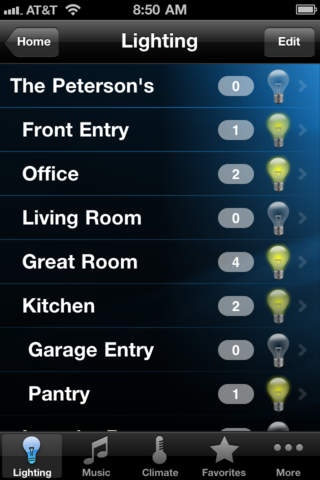
Transform your Apple device into a fully mobile touchscreen for your home entertainment and lighting system using your iPhone, iPod touch, or iPad. Connect via Wi-Fi or via the 3G network to monitor any enabled home from any location. This requires a Vantage InFusion home control system. For more information please visit www.vantagecontrols.com or contact your Vantage Dealer.
CAPABILITIES:
Predetermined UI
Automatically created from InFusion controller
Natural navigation conventions (flick, swipe, etc)
Lighting Control
Climate & Comfort Control
IP Camera Viewing
Multi Room Video Control
Video Source Control: Satellite and Cable Set-Top Boxes, Bluray and DVD Players, Media Servers
Multi Room Audio Control
Album Artwork
Playlist Management
Internet Radio
Favorites! for quick access to the most common devices and rooms
Add multiple homes/locations
This version works with Vantage InFusion home control systems running controller firmware version 2.3.63 or later. It will not work with earlier versions of firmware or with other control systems. Vantage thermostats and Vantage 450AV required for climate and audio system control. Vantage DMM required for music library content, playlist mgmt, album artwork and internet radio.
First time looking at the Vantage app? The Vantage app is free for demo mode only, which allows you to experience the navigation and control of a simulated Vantage home before you buy. Activation through a one-time in-app purchase of US$49.99 is required to allow full operation of your Vantage InFusion homes.
Requires iOS 3.1.3 or later. Compatible with iPhone, iPad, and iPod touch.
About Vantage Home Control
The company that develops Vantage Home Control is Vantage Controls, Inc. The latest version released by its developer is 1.1.3.
To install Vantage Home Control on your iOS device, just click the green Continue To App button above to start the installation process. The app is listed on our website since 2010-12-14 and was downloaded 17 times. We have already checked if the download link is safe, however for your own protection we recommend that you scan the downloaded app with your antivirus. Your antivirus may detect the Vantage Home Control as malware if the download link is broken.
How to install Vantage Home Control on your iOS device:
- Click on the Continue To App button on our website. This will redirect you to the App Store.
- Once the Vantage Home Control is shown in the iTunes listing of your iOS device, you can start its download and installation. Tap on the GET button to the right of the app to start downloading it.
- If you are not logged-in the iOS appstore app, you'll be prompted for your your Apple ID and/or password.
- After Vantage Home Control is downloaded, you'll see an INSTALL button to the right. Tap on it to start the actual installation of the iOS app.
- Once installation is finished you can tap on the OPEN button to start it. Its icon will also be added to your device home screen.
